Culture Amp
Helping to build a better world of work
Product Design
Design systems
Prototyping
Figma
Culture Amp
Helping to build a better world of work
Product Design
Design systems
Prototyping
Figma
Culture Amp
Helping to build a better world of work
Product Design
Design systems
Prototyping
Figma
Culture Amp
Helping to build a better world of work
Product Design
Design systems
Prototyping
Figma

Challenges
As a Senior Product Designer on the Kaizen Design System team at Culture Amp, my role was to work with teams across the company to build new components as needed while continuously improving existing ones. Over time, though, the design system had started to drift. The Figma component library and React codebase had fallen out of sync, leading to confusion and inefficiencies amongst teams.
Designers struggled with outdated components that didn’t take advantage of Figma’s newer features, and when projects began, teams lacked reliable page templates to kick things off. This created bottlenecks, inconsistencies, and wasted effort across teams.
KEY CHALLENGES
01
Figma and React libraries were out of sync, misrepresenting what was actually in the code base
02
Outdated Figma components lacked auto layout, variants, and usage guidelines
03
Missing component properties created uncertainty and slowed adoption
04
Teams had no page templates, leading to wasted time and mismatched layouts in development
05
Designers needed a consistent way to filter table and list data
Challenges
As a Senior Product Designer on the Kaizen Design System team at Culture Amp, my role was to work with teams across the company to build new components as needed while continuously improving existing ones. Over time, though, the design system had started to drift. The Figma component library and React codebase had fallen out of sync, leading to confusion and inefficiencies amongst teams.
Designers struggled with outdated components that didn’t take advantage of Figma’s newer features, and when projects began, teams lacked reliable page templates to kick things off. This created bottlenecks, inconsistencies, and wasted effort across teams.
KEY CHALLENGES
01
Figma and React libraries were out of sync, misrepresenting what was actually in the code base
02
Outdated Figma components lacked auto layout, variants, and usage guidelines
03
Missing component properties created uncertainty and slowed adoption
04
Teams had no page templates, leading to wasted time and mismatched layouts in development
05
Designers needed a consistent way to filter table and list data
Challenges
As a Senior Product Designer on the Kaizen Design System team at Culture Amp, my role was to work with teams across the company to build new components as needed while continuously improving existing ones. Over time, though, the design system had started to drift. The Figma component library and React codebase had fallen out of sync, leading to confusion and inefficiencies amongst teams.
Designers struggled with outdated components that didn’t take advantage of Figma’s newer features, and when projects began, teams lacked reliable page templates to kick things off. This created bottlenecks, inconsistencies, and wasted effort across teams.
KEY CHALLENGES
01
Figma and React libraries were out of sync, misrepresenting what was actually in the code base
02
Outdated Figma components lacked auto layout, variants, and usage guidelines
03
Missing component properties created uncertainty and slowed adoption
04
Teams had no page templates, leading to wasted time and mismatched layouts in development
05
Designers needed a consistent way to filter table and list data
↑
The Culture Amp design system in motion, with components building in and interacting to create a cohesive, flexible toolkit for product teams.
↑
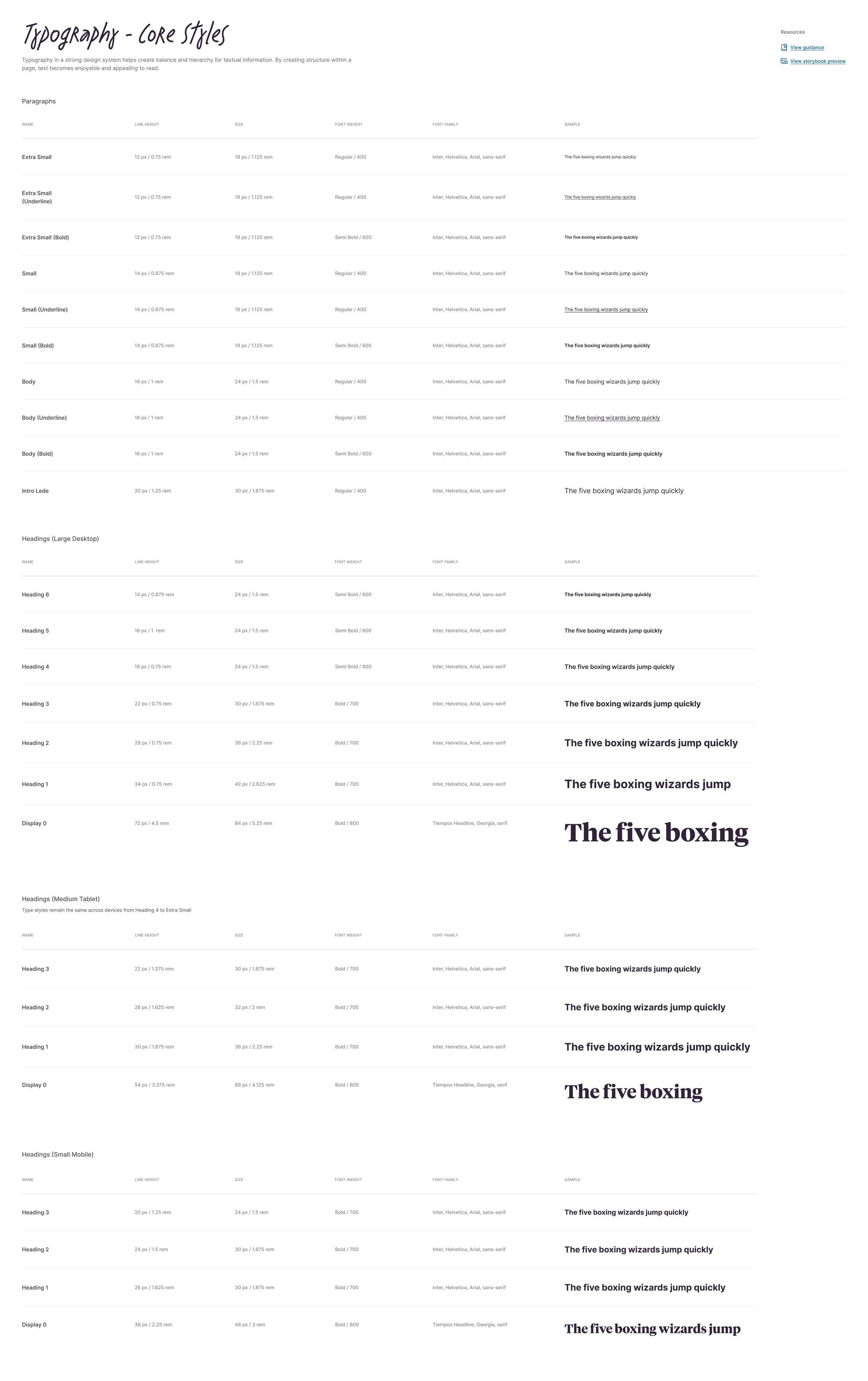
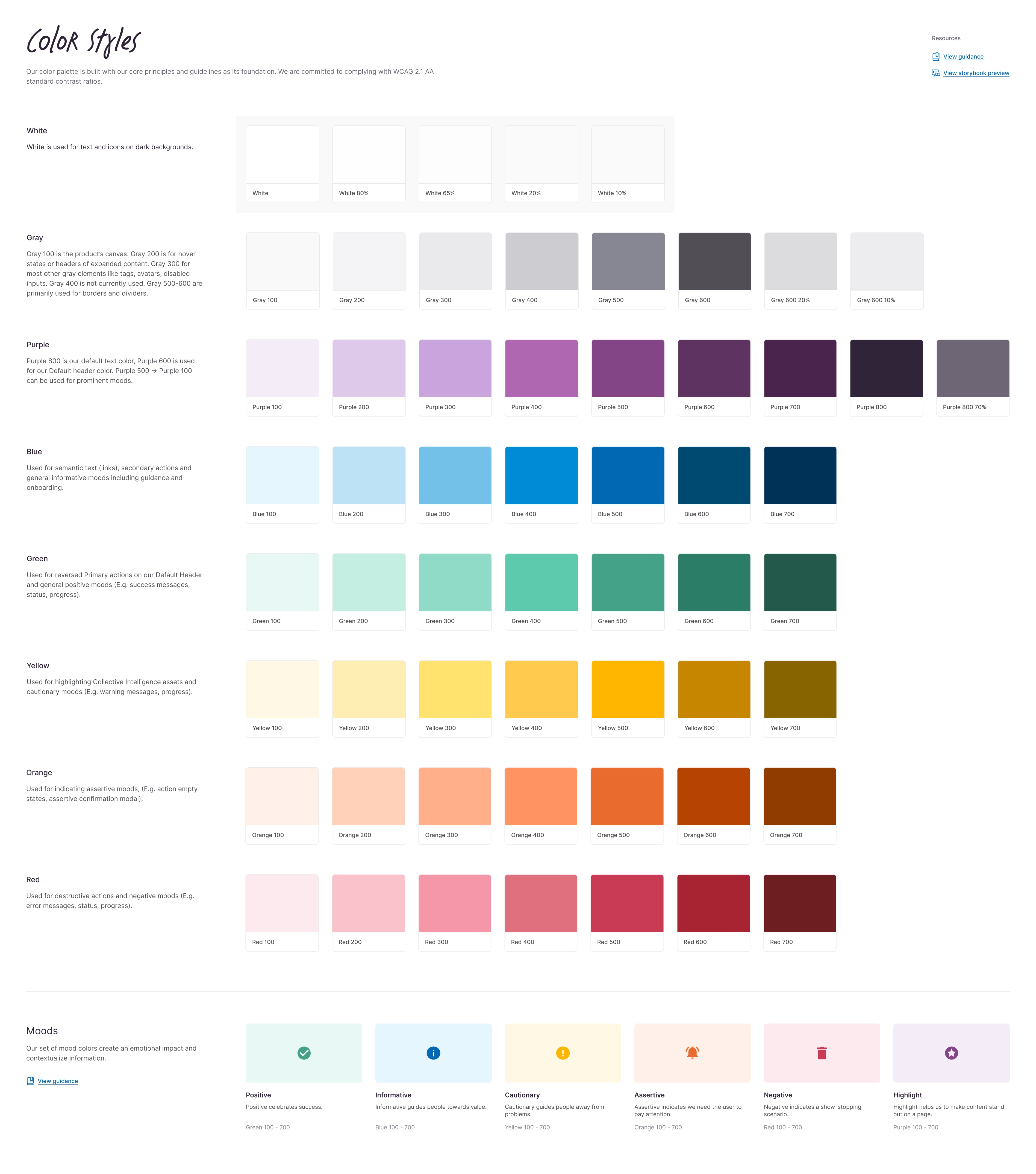
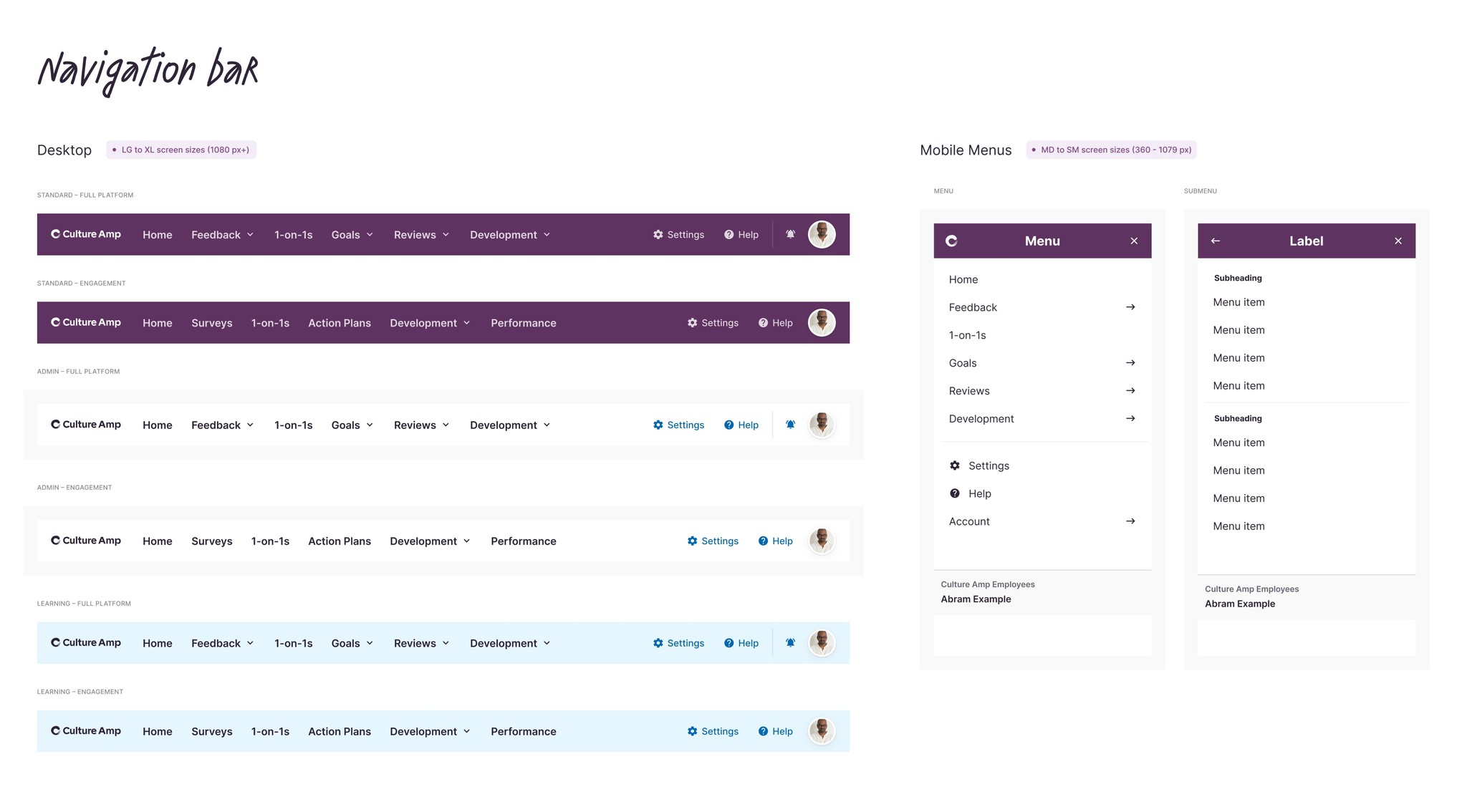
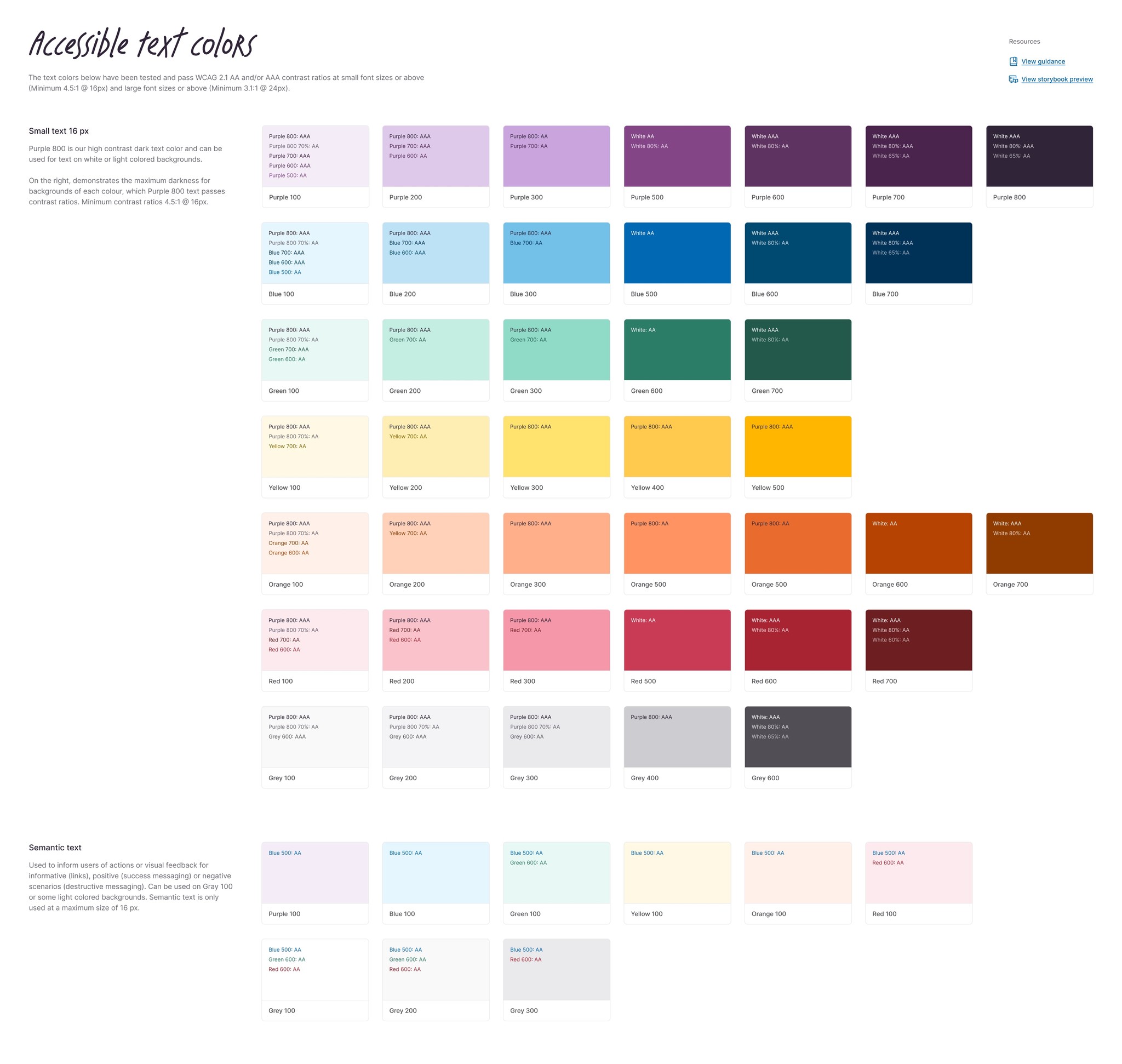
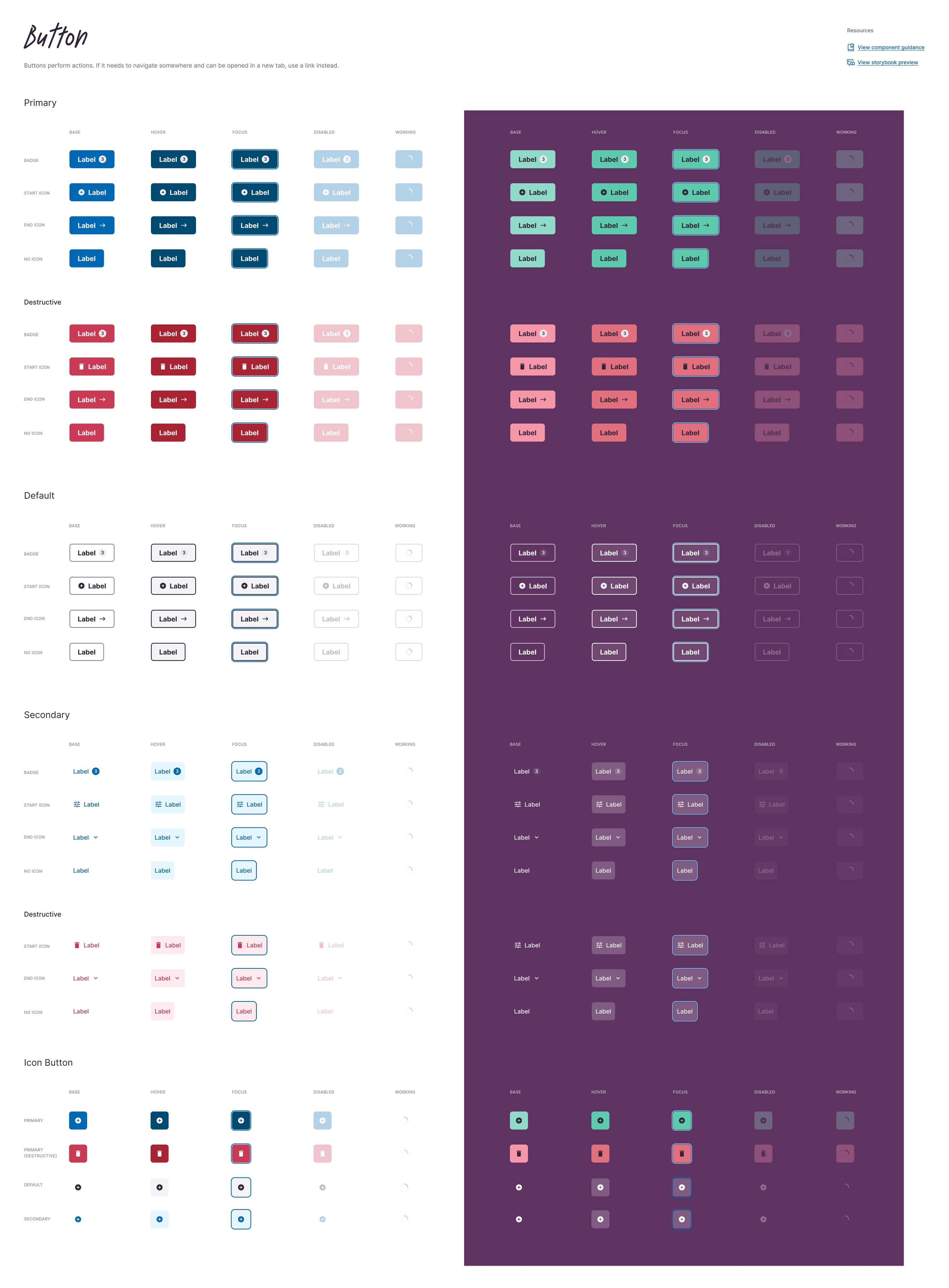
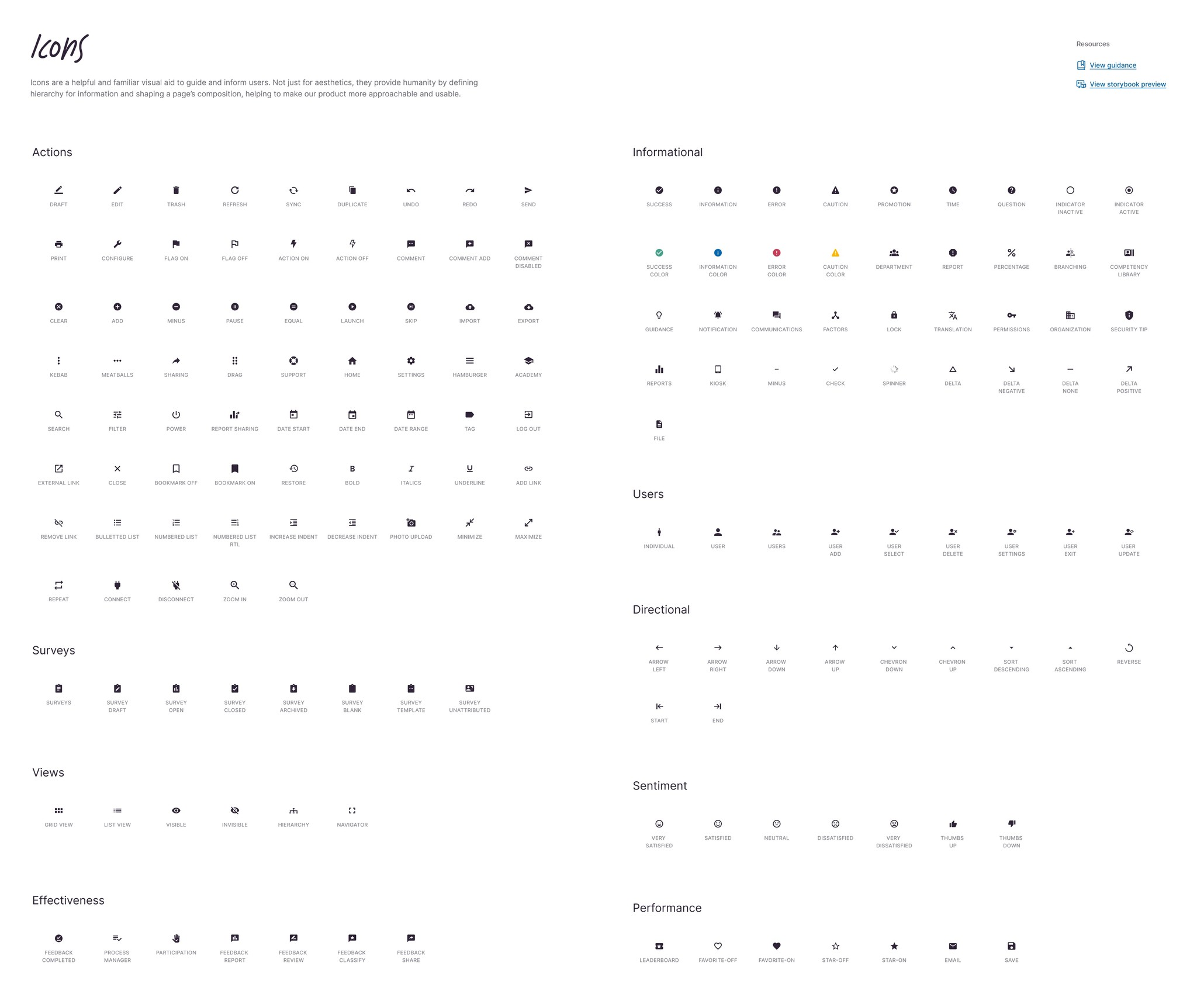
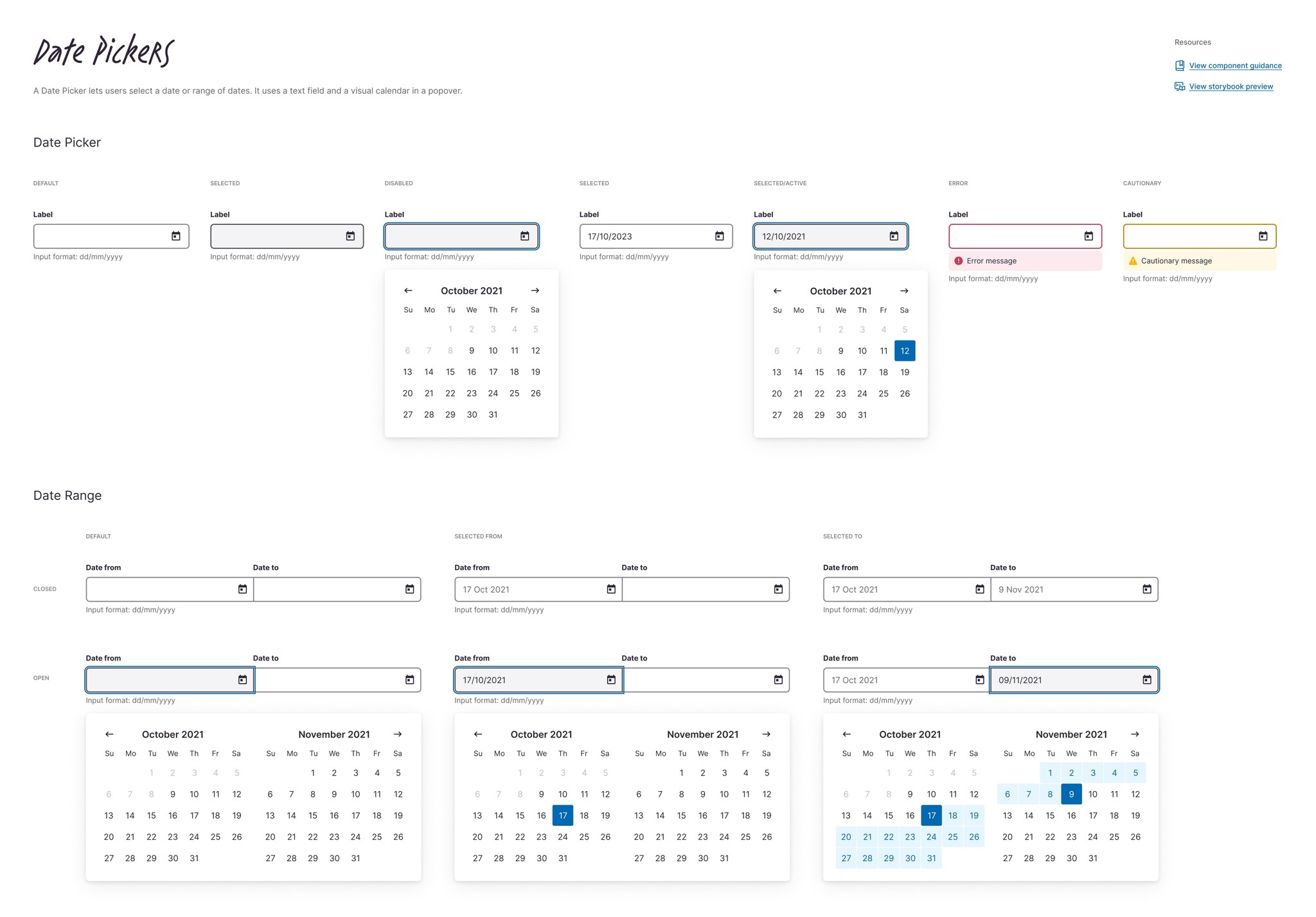
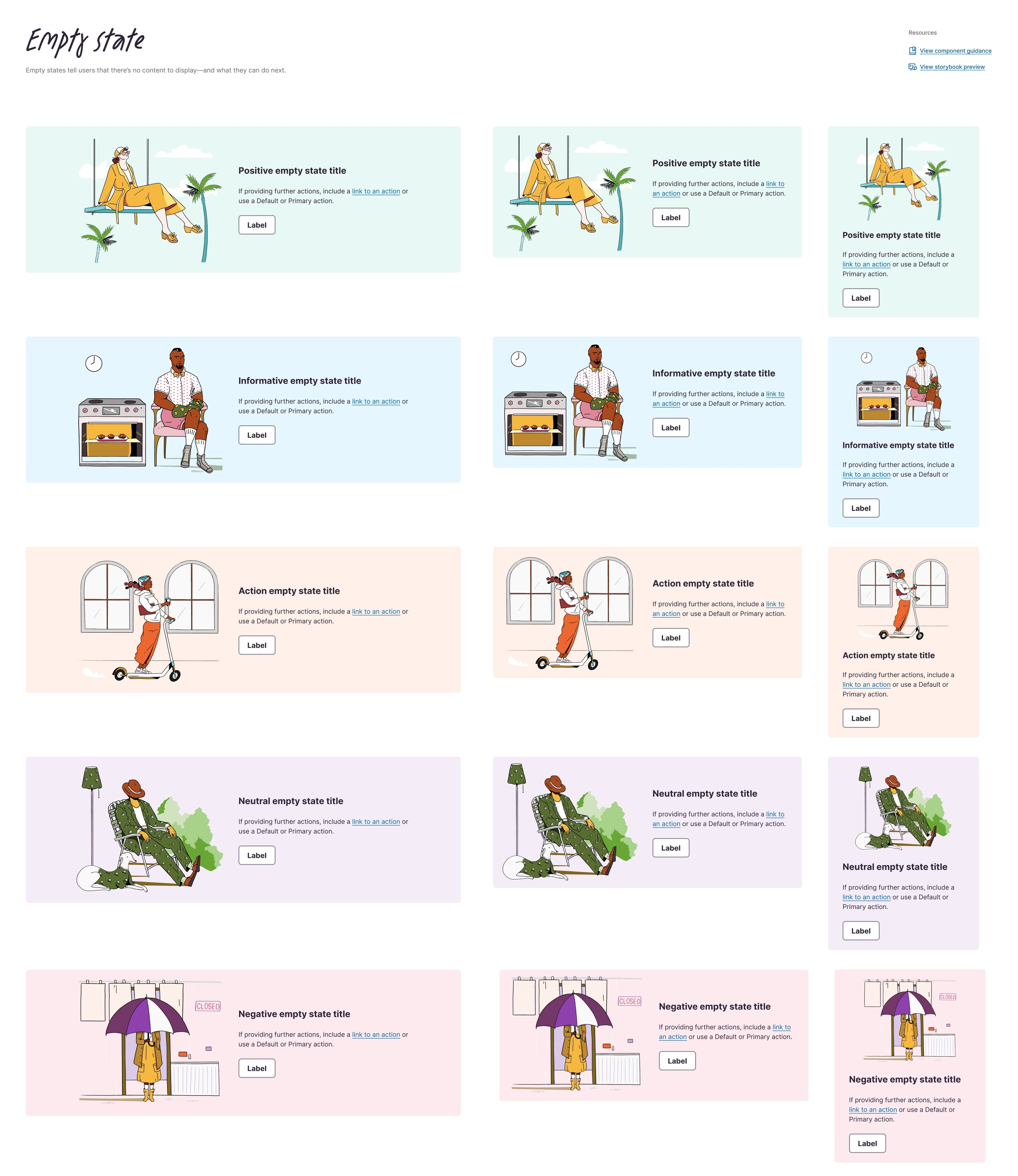
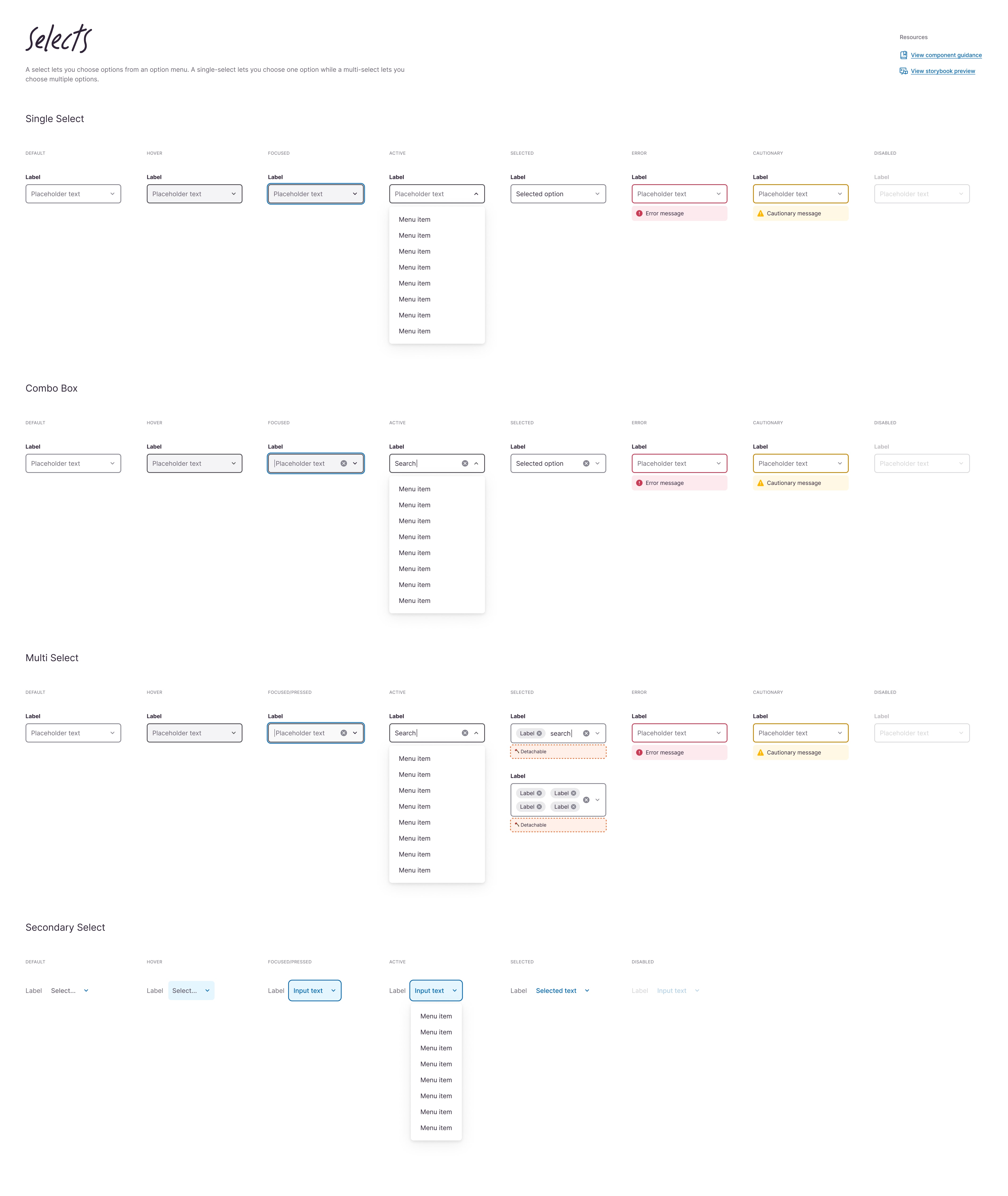
Examples from the Kaizen UI kit laid out as a visual reference and a quick-access tool for product teams.

↑
Components are constructed with tokens and primitives, then annotated and documented to make their makeup clear to users.
↑
All components built with user-friendly Figma attributes so users can quickly select the variation they need for a design.
Solution
I led the rebuild of the Figma component library, combing through each component and variant to ensure it matched the React Storybook. I collaborated closely with engineers to keep design and code aligned, refining structure, naming conventions, and organisation to make the library more intuitive and searchable.
To speed up project setup, I created Figma page templates and worked with developers to ensure matching coded versions were available. This gave teams a reliable way to begin projects without reusing outdated layouts or wasting time rebuilding from scratch.
For the filter bar, I partnered with product designers to understand their needs and design a flexible yet consistent solution for filtering table data. We validated the design through prototyping and usability testing before moving into development, ensuring it scaled to support major use cases across the product.
Solution
I led the rebuild of the Figma component library, combing through each component and variant to ensure it matched the React Storybook. I collaborated closely with engineers to keep design and code aligned, refining structure, naming conventions, and organisation to make the library more intuitive and searchable.
To speed up project setup, I created Figma page templates and worked with developers to ensure matching coded versions were available. This gave teams a reliable way to begin projects without reusing outdated layouts or wasting time rebuilding from scratch.
For the filter bar, I partnered with product designers to understand their needs and design a flexible yet consistent solution for filtering table data. We validated the design through prototyping and usability testing before moving into development, ensuring it scaled to support major use cases across the product.
Solution
I led the rebuild of the Figma component library, combing through each component and variant to ensure it matched the React Storybook. I collaborated closely with engineers to keep design and code aligned, refining structure, naming conventions, and organisation to make the library more intuitive and searchable.
To speed up project setup, I created Figma page templates and worked with developers to ensure matching coded versions were available. This gave teams a reliable way to begin projects without reusing outdated layouts or wasting time rebuilding from scratch.
For the filter bar, I partnered with product designers to understand their needs and design a flexible yet consistent solution for filtering table data. We validated the design through prototyping and usability testing before moving into development, ensuring it scaled to support major use cases across the product.
↑
Prototyping the Filter Bar at a high level of fidelity allowed us to test usability, refine interactions, and confirm functionality.
Outcomes
The updated library saw strong uptake, with teams reporting smoother workflows and greater trust in the design system. Designers were able to find and use components quickly, and confidence grew as the Figma and React libraries stayed in sync. Page templates reduced wasted setup time and eliminated mismatched layouts downstream.
The filter bar became a reliable, reusable solution for data-heavy views, balancing flexibility with consistency. By introducing weekly showcases and keeping an open dialogue with product teams, we built stronger alignment between design and engineering. This gave the design system a solid foundation for future growth and enabled product teams to move faster with fewer bottlenecks.
Outcomes
The updated library saw strong uptake, with teams reporting smoother workflows and greater trust in the design system. Designers were able to find and use components quickly, and confidence grew as the Figma and React libraries stayed in sync. Page templates reduced wasted setup time and eliminated mismatched layouts downstream.
The filter bar became a reliable, reusable solution for data-heavy views, balancing flexibility with consistency. By introducing weekly showcases and keeping an open dialogue with product teams, we built stronger alignment between design and engineering. This gave the design system a solid foundation for future growth and enabled product teams to move faster with fewer bottlenecks.
Outcomes
The updated library saw strong uptake, with teams reporting smoother workflows and greater trust in the design system. Designers were able to find and use components quickly, and confidence grew as the Figma and React libraries stayed in sync. Page templates reduced wasted setup time and eliminated mismatched layouts downstream.
The filter bar became a reliable, reusable solution for data-heavy views, balancing flexibility with consistency. By introducing weekly showcases and keeping an open dialogue with product teams, we built stronger alignment between design and engineering. This gave the design system a solid foundation for future growth and enabled product teams to move faster with fewer bottlenecks.
Credits
Role
Senior Product Designer
Client
Culture Amp
Year
2023
2023
Team
Jason Mitsios
Michael Winter
Cass Tam
Christian Klammer
Doug MacKenzie
Geoffrey Chong
Jess MacDonald
Other work
Other work